You can build an AI interview assistant for Windows with Python, Deepgram and Groq. The desktop app transcribes a question from your microphone or Windows playback and streams an answer suggestion using your practice profile, résumé and job description. It needs an internet connection for both cloud APIs. Deepgram's $200 starting credit can cover hundreds of hours of mono Nova-3 audio, and Groq has a Free Plan for answer generation. You can start within both allowances without buying a monthly subscription for the app.
What it costs to get started
You can try the assistant for $0 while Deepgram's starting credit covers your audio and your answer requests fit within Groq's Free Plan. At published paid rates, a 30-minute session with 10 GPT-OSS 20B answers costs about $0.15 at Deepgram's promotional rate or $0.23 at its regular rate. This assumes mono audio and 1,500 input and 250 output tokens per answer. See the cost breakdown.
API pricing last checked on November 29, 2026. Deepgram pricing · Groq model pricing · Groq Free Plan limits
What you'll build and what you need
You'll run a Windows desktop control panel and a separate window with the transcript and answer. The app reads one audio source at a time. It can test that source locally before you start listening, load context from files, switch answer models and keep the last four conversation messages for the next answer. For the setup below, you need Windows 10 or 11, 64-bit Python 3.13, a microphone or active audio playback device, and your own Deepgram and Groq API keys. FloxoLab reproduced the setup on one Windows machine.
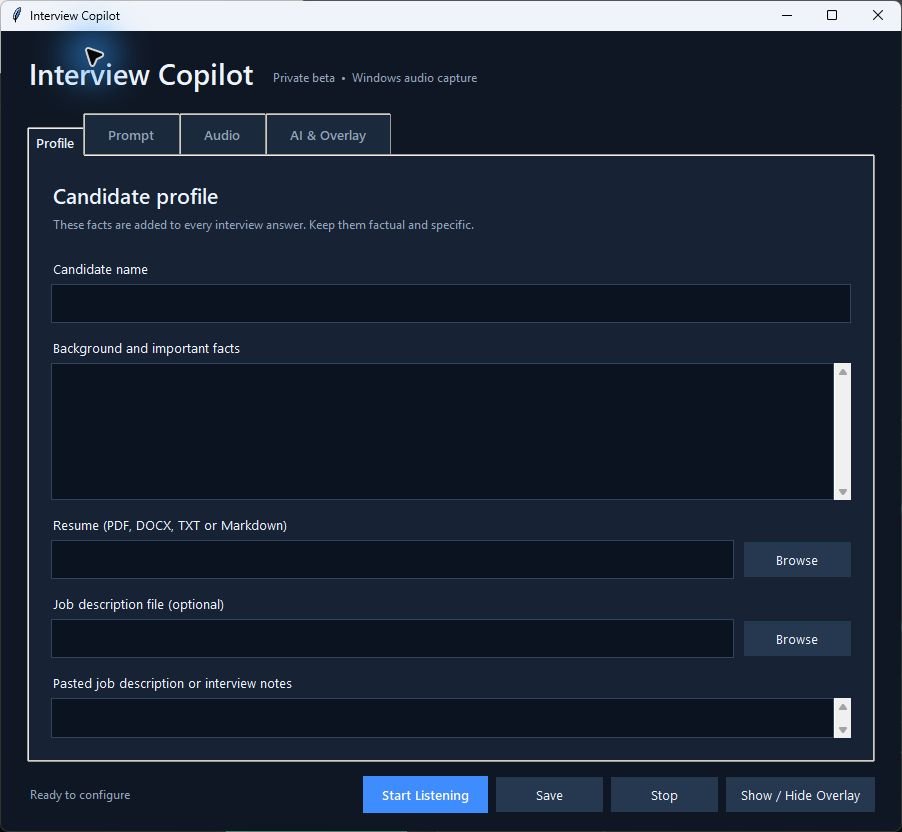
How the app turns a question into an answer
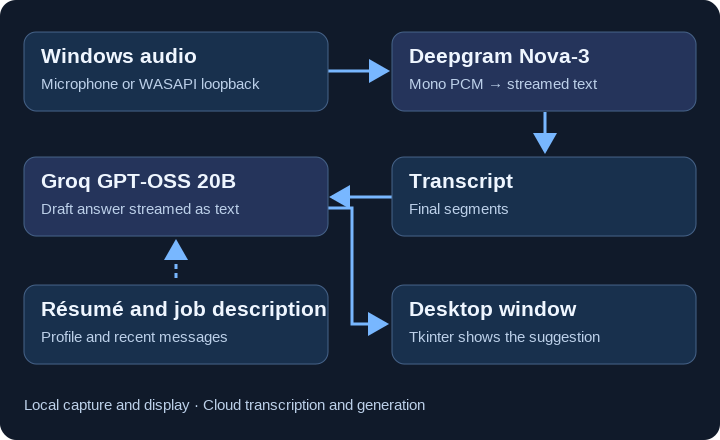
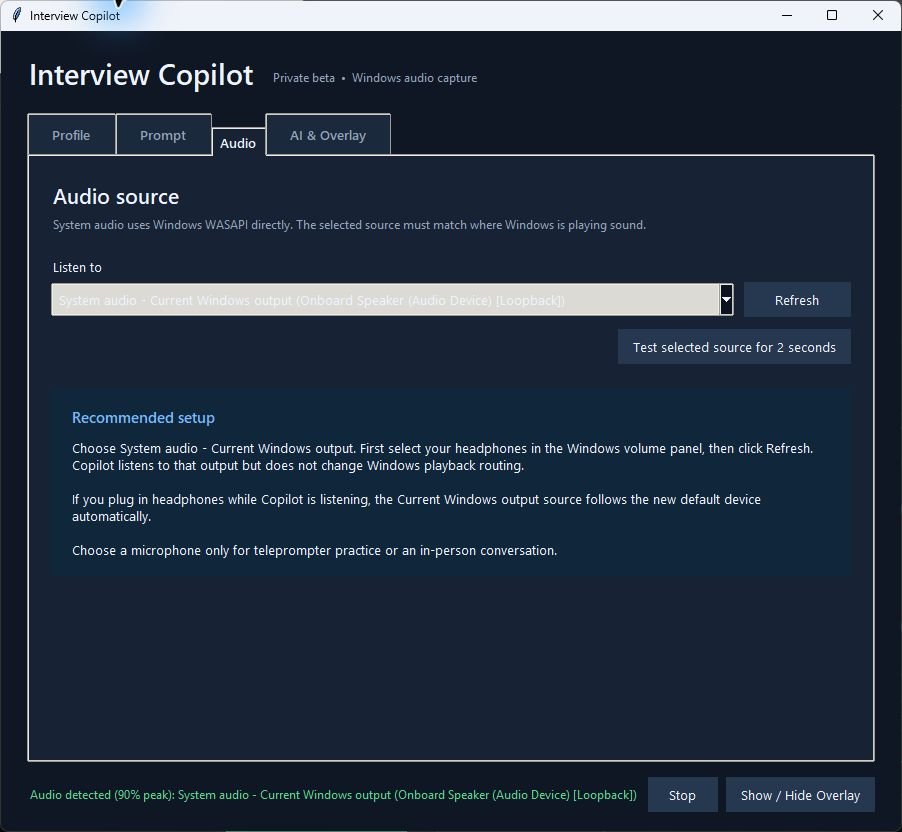
Choose one source in the Audio tab. The microphone captures what you speak into it. System audio - Current Windows output uses WASAPI loopback to capture what Windows plays through your current speakers or headphones. Loopback can pick up notifications and other apps on the same output. Choose the output in Windows first, then refresh the app's device list. This setup does not require a virtual audio cable. Microsoft WASAPI loopback · PyAudioWPatch
The app converts multichannel playback to mono before sending it to Deepgram as 16-bit PCM. The following excerpt illustrates the conversion. It keeps the sample rate unchanged. Pass the actual rate reported by your capture device to the speech API.
import numpy as np

def pcm16_to_mono(raw: bytes, channels: int) -> bytes:
    if channels < 1:
        raise ValueError("channels must be at least 1")
    samples = np.frombuffer(raw, dtype=np.int16)
    if channels == 1:
        return raw
    complete_samples = (samples.size // channels) * channels
    frames = samples[:complete_samples].reshape(-1, channels)
    return frames.mean(axis=1, dtype=np.float32).astype(np.int16).tobytes()
Deepgram returns text as the person speaks. An interim result may change. A final result commits a transcript segment, and a speech-end signal helps the app decide when the question is complete. The controller allows a brief pause for the speaker to continue, then sends the assembled text to Groq. The Tkinter window displays the response as chunks arrive. Deepgram on endpointing and interim results
Install Python and set up the project
- Install 64-bit Python 3.13 on Windows. If you want to check Tkinter separately, run
py -3.13 -m tkinter. A small test window should open. Python on Windows - Extract the source bundle into a folder you control and open PowerShell there. The bundle should include
main.py, the application modules, the companion tests andrequirements-repro.txt. See the source code and download. - Create a virtual environment and run the commands below. Calling the virtual environment's interpreter directly keeps these packages separate from other Python projects.
--list-devicesprints the available inputs and exits. The last command opens the control window. Python venv
py -3.13 -V
py -3.13 -m venv .venv
.\.venv\Scripts\python.exe -m pip install -r requirements-repro.txt
.\.venv\Scripts\python.exe -m pip check
.\.venv\Scripts\python.exe -m unittest discover -s tests -v
.\.venv\Scripts\python.exe main.py --list-devices
.\.venv\Scripts\python.exe main.py
The local test environment uses deepgram-sdk 5.3.2, openai 2.21.0, PyAudioWPatch 0.2.12.8 and sounddevice 0.5.5. Use the versions in the companion file when reproducing the guide. The original requirements allow older and newer Deepgram releases, while this app imports SDK v5 event types. Deepgram Python SDK migration notes
Connect Deepgram and Groq
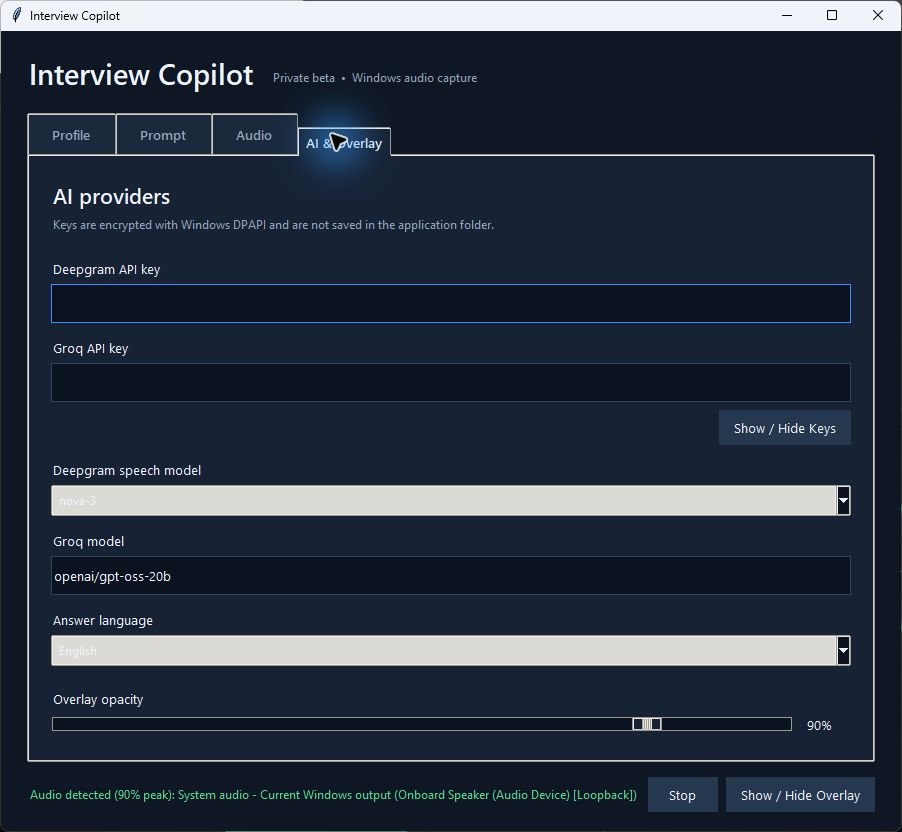
In the Deepgram Console instructions, choose your project, open Settings → API Keys and create a key with the access the app needs. In Groq Console, create a separate key using the Groq quickstart. Paste both into AI & Overlay and select Save. Keep the model defaults for your first run. You should see openai/gpt-oss-20b in Groq model. Groq OpenAI compatibility
On Save, the app stores API keys separately using Windows DPAPI. Keep keys out of source files, screenshots, and shared archives. The profile and file paths are stored as ordinary settings, so leave personal information out of any demo you plan to share. Microsoft DPAPI
Set up your microphone or Windows playback
Open Audio and select the input you want to test. Choose System audio - Current Windows output if you will play a prerecorded question, or choose a microphone if you will read it aloud. For a USB headset, set Windows to play through that headset before choosing the loopback source. Run Test selected source for 2 seconds with sound playing. A positive peak confirms local capture. Do this test again if you change devices.
Add your résumé and the job description
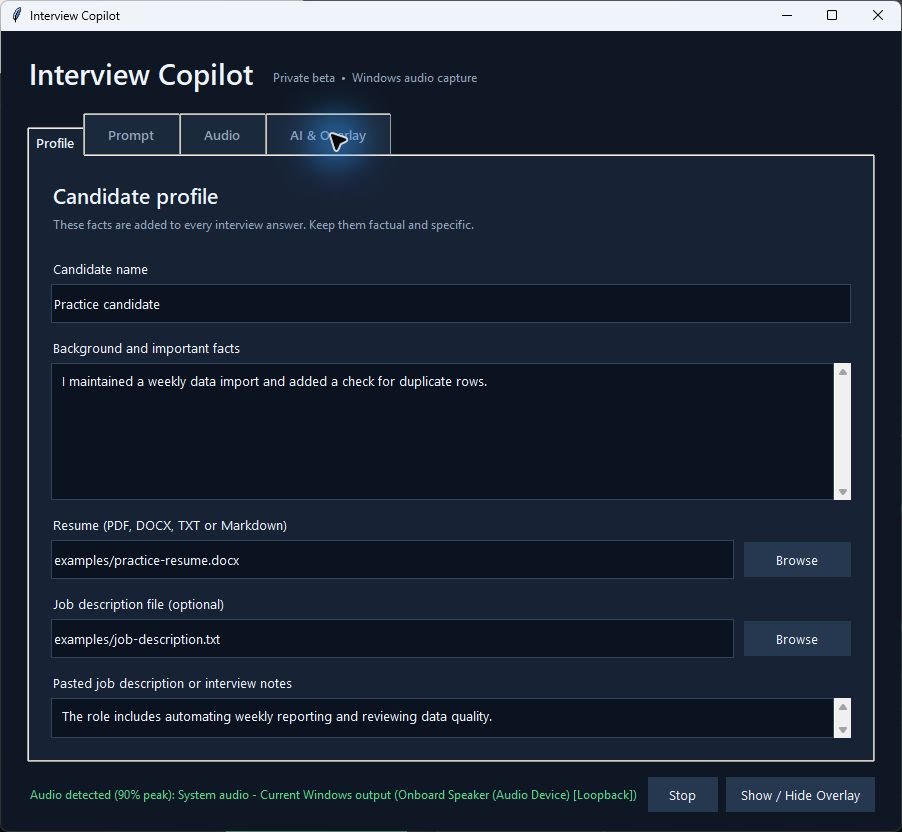
Open Profile. Use Browse to load the fictional résumé from the source bundle. Paste or load the job description. Keep the first example small so you can check exactly which claims the profile supports. The app reads PDF, DOCX, TXT and Markdown. With a scanned PDF, extract or paste the relevant text first.
Try one practice question
- In Profile, add a fictional candidate's notes and paste a short job description. Two sentences are enough. For example, “I maintained a weekly data-import script and added checks for duplicate rows. The role involves automating reporting.”
- With your audio input selected, have the sample recording ready. You can use the included test_phrase.wav when testing Windows playback.
- Choose Start Listening. When the app is listening, speak or play an English question such as “Tell me about a time you made a recurring process more reliable.”
- Watch for the transcript, then the suggestion. Check that it sticks to the facts in the profile. Click Stop when finished.
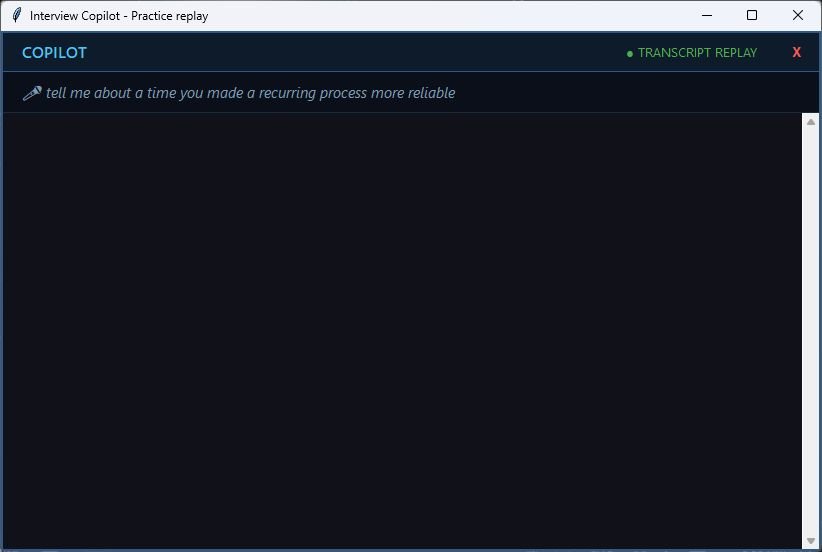
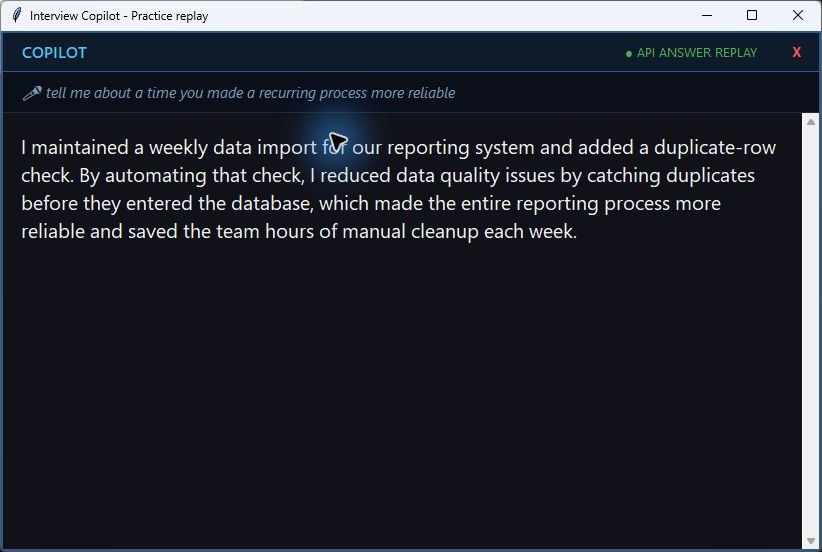
The two replay images show actual outputs from the synthetic question. The answer's claim about saving hours is unsupported by the fixture.
For a longer mock interview, prepare three questions. Pause the recording between questions or ask a practice partner to read them. Answer in your own words first, then look at the suggested structure. Check which details the model added and verify them before repeating them.
Troubleshoot one step at a time
| What you see | What to check |
|---|---|
| No signal in the audio test | Check the selected microphone or playback output. Play a sample through that output, then click Refresh after changing devices. |
| There is a signal but no transcript | Check that listening has started, that Deepgram accepts your key, and that the test question is audible and in English. |
| The transcript appears but no answer follows | Let the speaker finish and pause. Very short acknowledgements may be filtered. Check the Groq key, selected model and status messages. |
| The provider returns 401 or 429 | For 401, check the key and its project. For 429, check the project quota and wait for the retry interval if the provider supplies one. Handling API errors and retries |
| The answer adds details you never supplied | Shorten the practice profile and ask the model to stick to the facts provided. Correct the answer before using it. |
This version is set up to transcribe English speech. The answer language setting controls what the app asks the LLM to write. It does not change the transcription language.
Deepgram free credits and real-time transcription costs
Deepgram advertised $200 in starting credit on November 29, 2026, with no card required to start and no expiration on the credit. For English Nova-3 streaming, the pricing page showed $0.0048 per minute as a promotion and $0.0077 per minute as the regular comparison rate. The credit lasts for about 694 hours at the promo rate or 433 hours at the regular rate, assuming mono audio and no other use of the credit. Those are conversions from posted rates. Promotional pricing can change. Deepgram pricing
| Mono audio processed | Promo at $0.0048/min | Regular at $0.0077/min |
|---|---|---|
| 30 minutes | $0.144 | $0.231 |
| 1 hour | $0.288 | $0.462 |
| 10 hours | $2.88 | $4.62 |
| 50 hours | $14.40 | $23.10 |
| 100 hours | $28.80 | $46.20 |
| 500 hours | $144.00 | $231.00 |
If every session uses its full slot and you spend the credit only on this workflow, it covers 1,388 sessions of 30 minutes or 694 sessions of 60 minutes at the promo rate. At the regular rate, it covers 865 or 432 full sessions, respectively. Deepgram charges by the second of processed audio. Measure what reaches the API, including any transmitted silence. If you send multiple billable channels, Deepgram counts their combined duration. After the credit is used, check your billing options before continuing. Deepgram documents an HTTP 402 error when available funds are insufficient. Deepgram pricing and billing FAQ · Deepgram API errors
Groq Free Plan limits and pay-as-you-go pricing
For GPT-OSS 20B and GPT-OSS 120B, the published Free Plan baseline was 30 requests per minute, 1,000 per day, 8,000 tokens per minute and 200,000 per day on November 29, 2026. Check the limits for your organization. A few requests with long contexts can hit a token limit before you reach the request count. The app uses Groq, which provides model inference. Grok is a model family from xAI. Groq quickstart · Groq model limits
| Model ID | Paid USD per 1M input tokens | Paid USD per 1M output tokens |
|---|---|---|
| openai/gpt-oss-20b | $0.075 | $0.30 |
| openai/gpt-oss-120b | $0.15 | $0.60 |
| qwen/qwen3.8-27b (preview) | $0.80 | $4.00 |
Groq model accepts a compatible model ID. Change it in AI & Overlay and start a new session. The walkthrough and timings use GPT-OSS 20B. Availability, quota and answer quality should be checked separately for any other model. Groq model catalog · GPT-OSS 20B
For a planning estimate, assume 1,500 input and 250 billable output tokens per answer. Input includes the question, system instructions, profile, résumé, job description and up to four recent messages. A shorter test prompt used 367 input and 112 output tokens. The prices below use the larger planning scenario and assume paid rates.
| Answers | GPT-OSS 20B | GPT-OSS 120B | Qwen3.8-27B |
|---|---|---|---|
| 10 | $0.001875 | $0.003750 | $0.022000 |
| 100 | $0.018750 | $0.037500 | $0.220000 |
| 1,000 | $0.187500 | $0.375000 | $2.200000 |
To use the Developer Plan, open billing in the Groq Console and add a valid payment method. Groq bills usage at the end of the monthly cycle and when you first cross cumulative usage thresholds of $1, $10, $100, $500 or $1,000, with regional exceptions. Payment is automatic when an invoice is issued. Groq documents a minimum of $0.50 in usage before it bills you. The minimum is a billing threshold. The published model does not require a fixed monthly subscription or upfront credit purchase. Check regional billing details and configure organization spend limits before generating traffic on a paid account. Groq billing FAQ · Groq spend limits
How much does a DIY AI interview assistant cost?
You can pay $0 while Deepgram credit covers all processed audio and you stay within Groq Free quotas. If you run out of Deepgram credit or move to a paid Groq plan, estimate the two API bills separately. These examples assume mono English streaming, GPT-OSS 20B and the 1,500/250-token planning scenario. They exclude taxes and use case-specific extras.
| Example | Billable audio | Answers | Promo speech + paid answers | Regular speech + paid answers |
|---|---|---|---|---|
| Occasional practice, 4 half-hour sessions | 2 hours | 40 | $0.58 | $0.93 |
| Daily practice, 30 half-hour sessions | 15 hours | 300 | $4.38 | $6.99 |
| Intensive practice | 100 hours | 2,000 | $29.18 | $46.58 |
In these paid examples, processed audio accounts for most of the cost. Stop listening when the session ends and send only the context you need. The desktop app itself has no monthly fee in this setup. For a commercial reference, on November 29, 2026, CoPilot Interview advertised a free plan with sessions up to 15 minutes and a $24.99/month Standard plan with sessions up to 60 minutes. Compare the features you need when weighing a subscription against running the APIs yourself. CoPilot Interview pricing Estimating AI workflow costs with token counts
What we measured on Windows
FloxoLab installed the pinned dependencies in a fresh Python 3.13.12 environment, passed nine tests and verified Windows playback with a synthetic spoken question. The microphone opened and returned 43,168 frames in a one-second local check. That verifies capture frames. A controlled spoken microphone test was outside this run. The WASAPI playback test returned 47,104 frames with an 89.8% peak on the test machine. Separate tests extracted text from PDF, DOCX and TXT and checked that settings did not contain plaintext API keys. The application used an 88.3 MiB working set at idle in one clean-launch sample.
| Measurement | Observed in one synthetic run |
|---|---|
| Deepgram first interim transcript, from first audio send | 1.086 s |
| Deepgram first final segment, from first audio send | 3.995 s |
| Groq first visible answer fragment, from chat request | 0.426 s |
| Groq entire streamed response, from chat request | 0.523 s |
| Groq input / output tokens | 367 / 112 |
The speech fixture contained 4.234 seconds of synthesized audio followed by 0.5 seconds of silence. The test passed its actual transcript to Groq with the app's prompt builder. The two timers exclude the full UI and controller path. The figures are a single observation, with no percentiles or guaranteed latency. At published rates, the speech sent was equivalent to roughly $0.00038 at the promo rate and the Groq response to $0.000061 at paid 20B rates. Those are tariff equivalents. Account charges were not measured.
The fixture gave the model evidence of a duplicate-row check. The answer added that it saved the team hours each week, a claim the fixture did not support. A version grounded in the profile is “I maintained a weekly data import and added a check for duplicate rows.” Check every concrete claim before using a suggestion.
Privacy and permitted use
Deepgram receives audio from the chosen source. Groq receives the question, recent message text and profile context, including extracted résumé and job-description text. Local logs can contain question excerpts. Windows DPAPI protects saved keys for the current user. Treat local profile fields and logs as readable from that account. Before using real material, review both providers' data controls and remove identifying details that the practice session does not need. Deepgram data handling · Groq data handling
Use a recording you made or practice with someone who knows what will be captured and sent to the cloud. During an actual interview, follow the organizer's rules and get explicit permission for the specific feature and cloud processing. If the organizer permits captions only, leave answer generation off by using an approved captioning tool. This app's normal session connects the transcript to suggestions.
Source code and download
The ZIP includes the Python source, pinned dependencies, an example configuration without keys, tests, and fictional sample files. Download the Python source ZIP
The application source code is released under the MIT License. Copyright (c) 2026 Stepan Nikonov (FloxoLab). The ZIP includes the license and dependency notices. The MIT grant applies to the application code. FloxoLab is the official project website.
Frequently asked questions
Can I build an AI interview assistant for free?
Yes, while Deepgram credit covers your processed audio and your text requests fit within Groq's Free Plan limits. You also need a Windows PC and Internet access.
How long do Deepgram's $200 free credits last?
About 694 hours at $0.0048 per minute or about 433 hours at $0.0077 per minute for mono Nova-3 streaming. A second channel or other API usage changes that calculation.
Is the Groq API free?
Groq offers a Free Plan with per-model limits on requests and tokens. Check your organization's limits in the Console.
How much does Groq cost after upgrading?
GPT-OSS 20B was listed at $0.075 per million input tokens and $0.30 per million output tokens. At 1,500 input and 250 output tokens per answer, 100 answers cost about $0.019 at published rates.
Can I run it without a monthly subscription?
Yes. The app depends on usage-based providers with starter credit or free quotas. Choosing a paid API plan can lead to usage charges.
Can Python capture Windows system audio?
Yes. This project uses WASAPI loopback through PyAudioWPatch to read the audio on the selected Windows playback output.
Do I need a virtual audio cable?
No. Pick the loopback source for the active output and use the local audio test to confirm that sound reaches it.
Can it use my résumé and the job description?
Yes. Load files with selectable text or paste only the relevant details. The app sends the extracted text as context to Groq. Scanned PDFs without a text layer require separate OCR or pasted text.
Can I use different models?
Yes. Choose a Deepgram option in the speech model dropdown or enter a compatible Groq model ID. Confirm the model supports the app's streaming API parameters before using it.
Does the assistant work offline?
The desktop UI and local audio test can run offline. Transcription and suggestions in this walkthrough require cloud connections.
Does it support multiple languages?
This version sends English speech to Deepgram with language set to en. The answer-language setting asks Groq to write in another language. Changing the response language leaves speech recognition in English.
Where is audio processed?
Windows captures and converts the audio locally. The app then sends it to Deepgram for transcription. Groq receives text for the suggestion.
Start with one question
Use the included fictional résumé, check your audio source and verify a single answer against the facts you supplied. Once that works, try a three-question mock interview and compare the suggestions with what you would actually say.
To compare this desktop workflow with a scheduled API workflow, see FloxoLab's guide to n8n automation. For an example of handing more decisions to a model, see AI agents for business. If you are troubleshooting a separate HTTP integration that is not receiving events, see the n8n webhook troubleshooting guide.