
Our verdict
Screaming Frog SEO Spider is a strong choice when you need to investigate technical problems at URL level. The free version handles limited crawls; the annual licence becomes useful when you need saved projects, rendering, integrations, or repeatable audits. Its main cost beyond the licence is the expertise and time needed to interpret the results.
This review focuses on what the crawler helps you decide, its practical limits, and when to choose it over a cloud suite. Pricing and product documentation were checked on October 29, 2026. Screenshots come from Screaming Frog's published guides and Seer Interactive's walkthrough, with attribution beside each example.
What does Screaming Frog SEO Spider do?
Screaming Frog is a desktop website crawler for Windows, macOS, and Linux. It follows discoverable links and records responses, page elements, directives, and relationships between URLs. You can filter that inventory to investigate broken links, redirects, metadata, canonicals, internal linking, and other technical SEO questions.
The useful distinction is the level of evidence. You can select a problematic destination and inspect the pages linking to it, or compare a canonical declaration with the destination's response. Those connections help turn a warning into an implementation task.
It is not a keyword database, rank tracker, or backlink discovery platform. Nor does a crawl reproduce Google's entire indexing system. The official product overview describes the current feature set; the sections below explain which jobs justify using it.
| Your question | Useful evidence | Decision it supports |
|---|---|---|
| Where does this broken link come from? | Response code and source-page inlinks | Correct the link in the page or template |
| Why is this URL marked non-indexable? | Response, directives, canonical, and indexability status | Check whether the exclusion is intended |
| Is JavaScript hiding important content? | Raw and rendered content or links | Investigate a rendering dependency |
| What changed after a release? | Comparable crawl snapshots and changed fields | Accept the change or investigate a regression |
| Do templates contain the required element? | Custom search or extraction results | Find missing or inconsistent implementation |
Free vs paid: pricing and the limits that matter
The free version allows up to 500 URLs per crawl. A single-user annual licence is £199 / $279 / €245 on the public offer checked October 29, 2026. Licences are per user; bulk discounts start at five. See the official price and feature comparison for the selected currency and checkout total.
| Capability | Free | Licensed |
|---|---|---|
| Crawl allowance | 500 URLs per crawl | No fixed URL cap; hardware limits apply |
| Broken links, redirects, titles, directives | Included | Included |
| Save and reopen crawl projects | Unavailable | Included |
| JavaScript rendering and crawl comparison | Unavailable | Included |
| Custom extraction and scheduling | Unavailable | Included |
| Google integrations and structured-data validation | Unavailable | Included |
500 URLs does not mean 500 finished pages
A crawl inventory can contain HTML pages, images, stylesheets, scripts, redirects, and URL variants. Inspect the content types and progress rather than assuming a site with fewer than 500 articles will fit. A truncated crawl is a sample, not proof that the rest of the website has no problems.
The free edition is useful for learning the interface, investigating a compact site, or checking a small assignment. The FAQ also makes clear that configuration is restricted and saved crawl projects cannot be reopened after a licence expires. Export the findings you need and distinguish an export from a resumable project.
When the licence is worth paying for
Buy around a requirement: rendering a JavaScript site, preserving an audit baseline, comparing releases, extracting a template field, or joining crawl data with Google evidence. Site size is only one reason to upgrade. A small app can need rendering; a small agency can need saved projects and repeatable settings.
Calculate the value against a real assignment. How much time does the required capability save, and can someone act on its output? The licence does not include implementation work, specialist API subscriptions, or unlimited third-party AI usage.
Interface and learning curve: powerful once you know the question
The main table contains URLs and fields. Tabs and filters narrow the investigation; selecting a row populates detail panes below. The right-hand Overview and Issues panels provide a starting point when you do not yet know which filter to open.
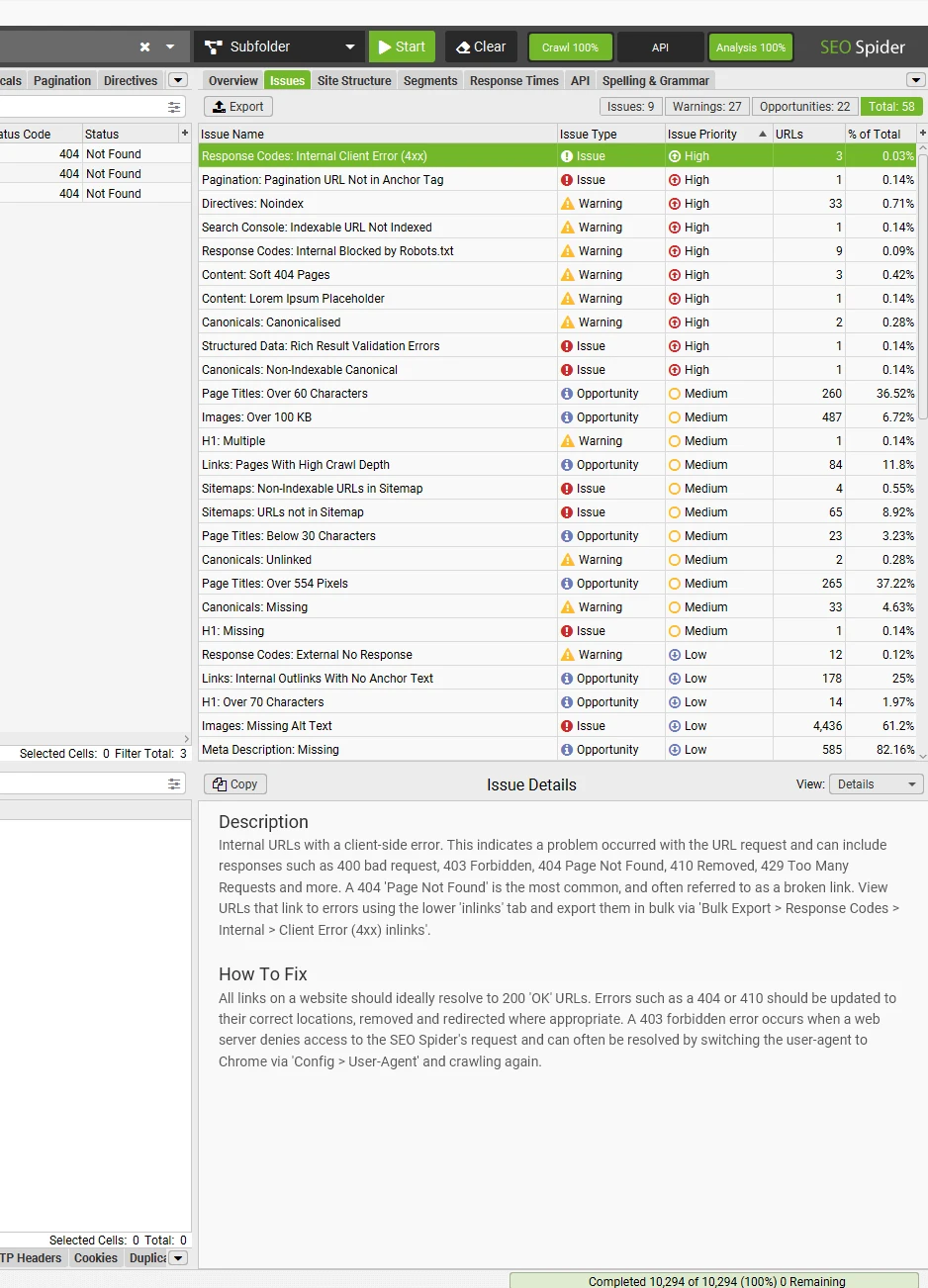
The Issues documentation distinguishes issues, warnings, and opportunities, with estimated priorities and explanatory text. That corrects a common criticism: the tool does offer guidance. What it cannot supply automatically is your site's business context.
A noindex on a private utility page may be correct; the same directive on a public service page may need urgent attention. Learn one investigation at a time: identify the affected URLs, inspect a representative page, find the source, and describe the expected behavior. That is more productive than trying to clear every warning in the first session.
Broken links and redirects: from a destination to the source
This is one of the easiest capabilities to evaluate. Filter response codes for client errors, select a destination, and inspect its inlinks. The source URL and link text tell you where to make the correction. For a wider handoff, export the corresponding inlinks report.
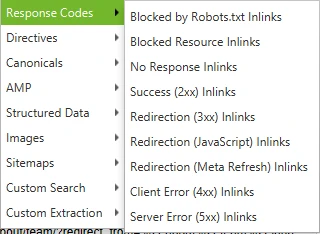
Seer's walkthrough is useful because it connects a filtered result to the links that produced it. The review question is whether that export gives a developer enough information to act without reconstructing the problem.
For example, if a navigation component links to an outdated service URL, fixing the shared component may resolve many affected pages. If the destination intentionally returns 410, the task may be removing internal links to it. Redirecting every missing page to the homepage would hide the symptom without identifying the right destination.
Redirects need interpretation too. Some are deliberate routing behavior; chains and internal links to obsolete addresses can create unnecessary hops. Use the broken-link guide and redirect tutorial for the exact exports. Recheck unexpected errors before assigning work, especially when the server has rate-limited the crawl.
Canonicals and indexability: diagnose implementation, then check Google
Indexability is a crawl classification. It helps identify URLs excluded by responses or directives and surfaces canonical relationships. It is different from evidence that Google has indexed a page. An indexable URL can still be absent from search.
The canonical audit guide explains how to inspect implementation across a site. Start with an important page: what canonical does it declare, does that destination resolve, and is the chosen relationship intentional? A non-indexable canonical destination deserves investigation.
For a migration, compare a sample from each template. A single incorrect template value can affect many URLs, while an isolated query-string variant may be intentionally consolidated. Record the intended owner URL before deciding a canonical is wrong.
Use Search Console for Google's indexed view and selected canonical. Screaming Frog's URL Inspection integration can bring that evidence beside crawl data, subject to Google's quotas.
JavaScript rendering: worth the licence when HTML is not enough
Text-only crawling inspects the initial HTML. JavaScript rendering uses an integrated browser to execute scripts and inspect the resulting page. Choose the mode around the question: whether important content, links, or directives depend on client-side behavior.
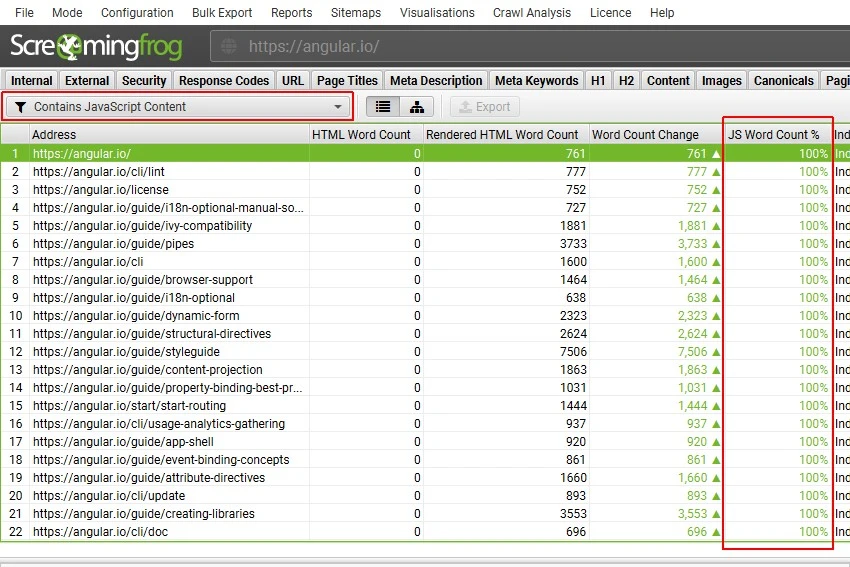
The screenshot illustrates a useful diagnostic: content appearing after rendering can be absent from the original HTML. That is a dependency to inspect.
Check a representative set of product, category, or service pages before launching a full rendered crawl. Confirm the expected elements appear and the necessary resources load. Rendering is slower and more resource-intensive, so a fully server-rendered site may not need it for every routine check.
The limitation is reproducibility. Browser settings, blocked resources, consent interfaces, and timing can affect what the crawler sees. Save the configuration with the result so a later comparison answers the same question.
Metadata, duplicates, and custom extraction
Page-title, description, and heading filters make it easier to find patterns across templates. A duplicate title on unrelated landing pages may be a useful fix; a length warning alone says little about whether a title serves the reader. Review affected groups rather than rewriting every flagged string.
For content duplication, distinguish identical responses from near-duplicate templates and intentional URL variants. The duplicate-content tutorial describes the checks. A similar paragraph or reused navigation should not automatically become a page-deletion recommendation.
Custom extraction adds a more specific investigation. CSS selectors, XPath, or regular expressions can pull a field from raw or rendered HTML. That is useful when the standard columns do not answer your implementation question.
For example, an ecommerce team could extract product availability or a template identifier and group the results by page type. Validate the selector on a few known pages first. An empty cell can mean the element is missing, the selector is wrong, or the page was not rendered as expected. Test those explanations before treating the export as a defect list.
Internal links, crawl depth, and missing pages
A link crawl reveals a navigable path from its starting point. Inspect depth and inlinks to identify important pages that are difficult to reach, then evaluate the links in context. A footer link repeated across the site is different from a useful contextual recommendation on a related page.
The internal-linking guide explains the relevant reports. Use them to investigate navigation and page relationships. A crawl-depth value is a property of that crawl's starting URL and configuration, not a universal measurement of importance.
The blind spot is discovery. An orphan page cannot be found by following links that do not exist. Compare the inventory with a sitemap, CMS list, or other known URL sources before calling it complete. Missing from the crawl can mean undiscovered, excluded, blocked, or outside the chosen scope.
Generating an XML sitemap is useful only after you decide which URLs should belong in it. A generated list still needs the site's canonical and indexing rules. For the full reconciliation and prioritization process, use our technical audit workflow with Screaming Frog and Search Console.
Structured data and hreflang: check patterns across templates
The licensed structured-data validation workflow helps inspect markup across many pages. Group errors by template: a repeated missing property may come from one shared component, while an isolated error may belong to a single content record.
Check a representative page and the markup actually delivered before assigning the fix. Passing validation does not establish that the claims in the markup are true or that Google will display a rich result.
For international sites, the hreflang audit workflow helps investigate language and region relationships and common implementation errors. The decision still needs the intended locale map: which page serves which audience, which URLs should be canonical, and which alternate versions should exist. It is useful for release QA, but it does not replace reviewing translated content or the business's market choices.
Crawl comparison: a stronger reason to pay than a bigger URL limit
Saved baselines make the crawler useful after the initial audit. The comparison tutorial shows how to compare crawls and enable change detection for selected fields such as titles, headings, depth, and inlinks.
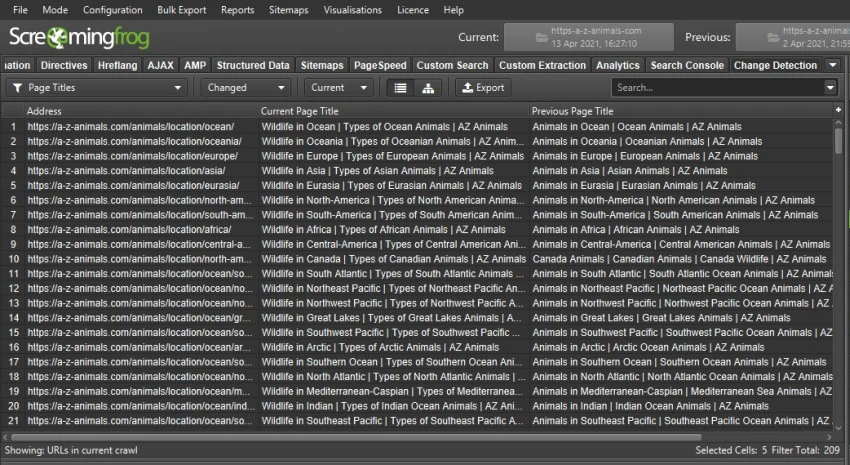
This supports a clear release check: did the intended template fields change, did important URLs disappear, and did a new response or directive appear? Use the URL-level changes to explain the result rather than reporting only that an issue count fell.
Keep scope and rendering consistent. Otherwise a configuration change can look like a website change. For staging comparisons, URL mapping can align equivalent addresses on different hosts. Review the mapping before interpreting missing pages.
Google integrations, reporting, and AI features
Google Analytics, Search Console, and PageSpeed Insights integrations let you enrich a crawl with additional measurements. The buying value is joining evidence by URL: a technical finding becomes more useful when you can see whether the page matters to the site's search activity.
Keep the source of each metric visible. A crawl response time is not a Core Web Vitals verdict. A page without impressions in the chosen period is not automatically unimportant. Confirm the reporting window and URL matching before drawing conclusions from a joined export.
The product also supports AI-assisted analysis and custom JavaScript workflows. The official AI walkthrough gives examples of sending page elements to a model during a crawl. Possible jobs include classifying content or drafting an image description.
Evaluate one small task first. Check the selected provider's access and usage cost, inspect a sample of outputs, and keep a human review before changing content.
For a handoff, use a focused export: affected URL, source or template, evidence, proposed action, and recheck.
Performance: RAM, storage, and crawl configuration
The licensed crawler has no fixed URL ceiling, but available memory, disk, crawl settings, and the website's response determine practical capacity. Database storage can help large crawls use disk rather than keeping all working data in memory. The large-site guide explains the tradeoffs.
Set the scope before increasing resources. Filter combinations, calendars, and parameter variants can generate a huge inventory without adding useful evidence. Check whether you are crawling the intended host, directories, URL types, and rendered resources.
Start with a sample and observe response codes. If the server begins rate-limiting requests, reduce the crawl rate and recheck affected URLs. Compare the result with a normal browser request before treating every crawler error as a broken page.
There is no useful universal promise that a certain laptop will crawl any site of a given size. Estimate from a representative run with the actual storage and rendering settings. A desktop workflow also needs someone to preserve projects and maintain the machine used for scheduled jobs.
Screaming Frog pros and cons
Advantages
- URL-level responses, page elements, and link relationships support specific investigations.
- Saved configurations, extraction, and comparisons suit repeatable technical work.
- A free edition lets you learn and test compact assignments before buying.
Tradeoffs
- The interface rewards technical knowledge and a defined question.
- Desktop resources and configuration affect crawl capacity and reproducibility.
- Keyword discovery, ranking history, and backlink discovery require other tools.
Who should choose it, and what are the alternatives?
| Situation | A sensible starting point |
|---|---|
| Technical SEO or developer investigating templates | Screaming Frog, with rendering or extraction if required |
| Small site and a one-off link or metadata check | Try the free edition and confirm crawl coverage |
| Recurring audits or migration QA | Licensed crawler with saved baselines and comparisons |
| Keyword research, tracking, and recurring client reports | Evaluate an SEO suite such as SE Ranking |
| Google indexing or actual search performance | Search Console, alongside the crawl evidence |
| Large shared crawl program with team access | Compare the desktop workflow with a hosted crawling platform |
Our SE Ranking review covers the suite workflow, and the SE Ranking vs Semrush comparison covers the broader research decision. A crawler and a suite can complement each other. Choose the report and working process you need before comparing their prices.
For an owner who does not plan to interpret crawl data, start with the free SEO toolkit or a focused SEO audit.
A practical first-crawl evaluation
- Define one question. Choose a link problem, a template check, or a release comparison.
- Choose a representative scope. Include the page types required to answer it and record the starting point.
- Check coverage and settings. Confirm whether the limit, exclusions, or rendering mode affect what you see.
- Inspect several known pages. Make sure the tool's output matches the implementation you can verify.
- Export one fixable finding. Include the source, affected URL, expected behavior, and validation step.
- Evaluate the workflow. Decide whether a paid capability removes a real obstacle or simply expands the menu.
Final decision: choose the capability your assignment needs
Start with a compact assignment in the free edition. Upgrade when you can name the obstacle: rendering, saved projects, comparison, extraction, or an integration. Keep the free edition when it already covers the job.
Frequently asked questions
Is Screaming Frog free?
There is a free edition with a 500-URL crawl limit and restricted features. It is not a time-limited trial of every paid capability. See the free-versus-paid table for the important differences.
How much does Screaming Frog cost?
The current single-user annual prices and licence boundaries are listed in the pricing section above. Use the official checkout for the selected currency and total; the licence is distinct from any third-party API or AI usage charges.
Is Screaming Frog safe to use?
Download it from the official developer site. A crawl makes requests to the target server, so choose a sensible scope and rate. Connecting third-party services or running custom code adds permissions and data flows that should match your task.
Does it tell me whether Google indexed a page?
A normal crawl reports implementation and indexability signals. Use Google's indexing evidence, directly or through the URL Inspection integration, for the indexed state. These sources answer different questions.
What does “canonicalised” mean?
It indicates that the crawl found a canonical relationship pointing elsewhere. Check the declared destination and intended page owner. It does not mean you should remove every canonical or that Google necessarily chose the same URL.
Can the free version crawl JavaScript websites?
It can request their initial HTML, but executing JavaScript with the rendering feature requires a licence. Whether that matters depends on which content and links are present in the initial response.
Can Screaming Frog find orphan pages?
A link crawl needs another source to discover an unlinked URL. Reconcile the crawl with known URL lists, sitemaps, or connected data before deciding which pages lack internal links.
Does it fix technical SEO issues automatically?
It identifies and exports evidence. A developer, editor, or site owner still needs to make the appropriate implementation change and verify the result.
Can it replace SE Ranking or Semrush?
It covers technical crawling rather than the complete keyword research, rank-tracking, and competitor-research workflow. Compare the task you need, not the number of features in each interface.
Is it worth buying for a small site?
Size is only one factor. Rendering, saved baselines, custom extraction, or integrations may justify a licence on a small website. For a limited one-off check, test whether the free edition already supplies the evidence you need.
Sources and screenshot credits
Checked October 29, 2026. Interface examples retain the publishers' sample data and may show earlier releases. Product facts use official documentation; recommendations reflect the workflows discussed above.
- Pricing and feature matrix, FAQ, and getting-started guide.
- Tabs and Issues documentation, broken links, and canonical auditing.
- JavaScript rendering, custom extraction, and crawl comparison.
- Large-site configuration, URL Inspection integration, and AI-assisted crawling.
- Seer Interactive: practical Screaming Frog guide and credited export-menu example.